
Flowdrive File Request Feature
Flowdrive’s File Request lets you collect files from anyone via a simple shareable link, no accounts, no hassle, just organized uploads.
February 24, 2026 · Product Guides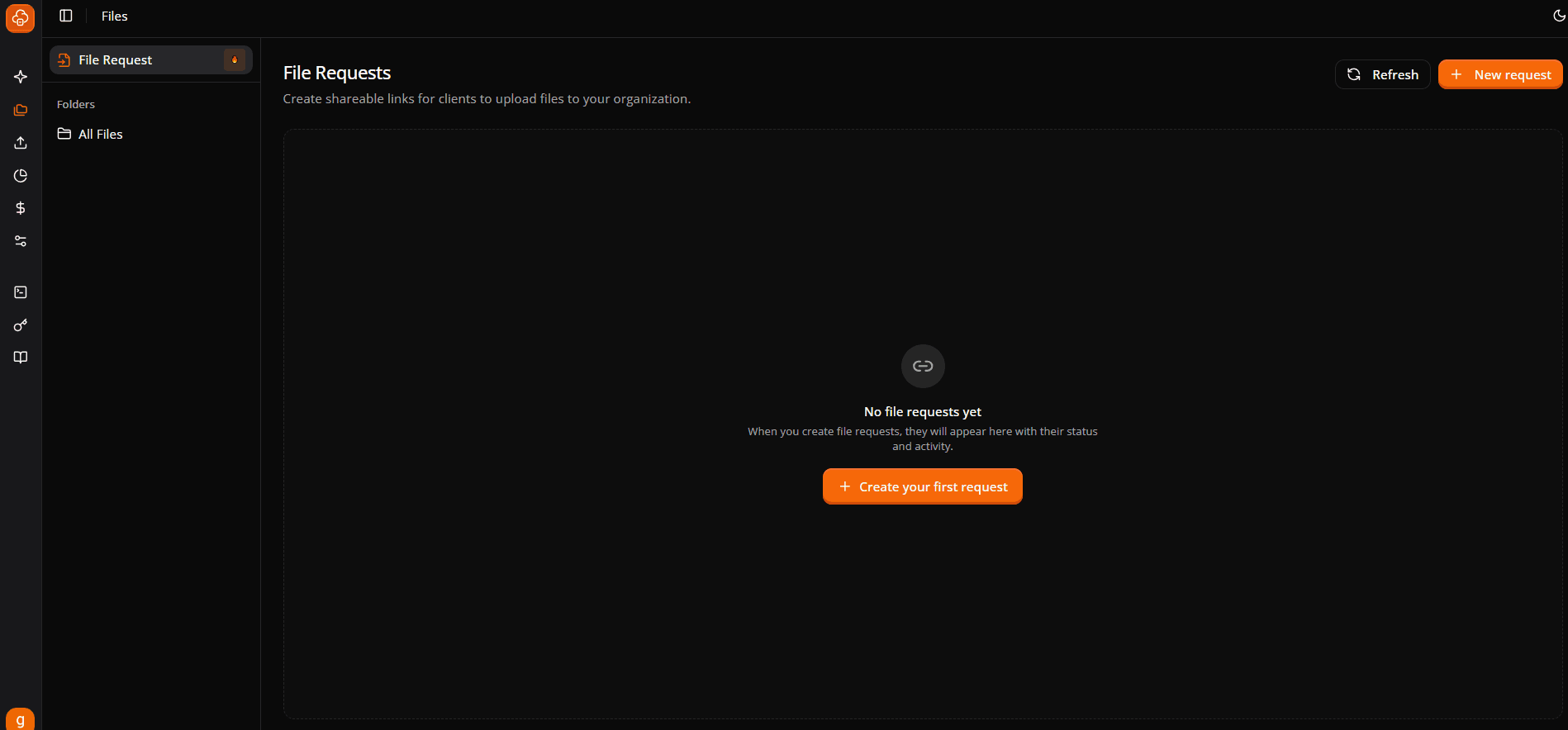
You need files from a client. Logo files, brand assets, project materials, whatever it is, you need them uploaded somewhere organized and accessible.
So, what do you do? That's why Flowdrive has launched File Requests, a dead-simple way to gather files from anyone (customers, contractors, job applicants, basically anyone) via a shareable link.
No accounts are required. There are no unclear permissions. Just provide a link and receive files that are sorted exactly where you need them.
Let us show you how it works.
File Requests in FlowDrive
Flowdrive's newest feature, File Requests, solves one specific problem: collecting files from people who don't have (and shouldn't require) access to your Flowdrive dashboard.
This is how it works.
1. Create a File Request in your Flowdrive dashboard.
2. You receive a unique shareable URL (looks like: 'https://app.tryflowdrive.com/request/abc123xyz').
3. You send the URL to anyone: customer, contractor, candidate, guest, etc.
4. They upload files directly using the URL.
5. Files appear instantly in your arranged Flowdrive folders.
That's the entire feature. And it is available on all plans, including the free plan.
How to Make Your First File Request
Let's walk through the exact procedure.
Step 1: Open Your Flowdrive Dashboard
Log into app.tryflowdrive.com and select Files from the left sidebar.
You'll see two tabs at the top:
- All Files (normal storage)
- File Request (new features)
Select "File Request."
Step 2: Create a New File Request
If you are utilizing the features for the first time, you will see an empty state that says: " no file requests yet. When you make file requests, they will appear here along with their status and activity.
Click the orange. "Create your first request" button (or if you already have requests, click the "+ New request" at the top right).
Step 3: Fill Out the File Request Details
A modal displays three fields:
Name (required)
- This is what you and the uploader see on your dashboard.
- Make it descriptive for your own organization.
Description (optional but highly recommended)
- This is what uploaders view on the upload page.
- Use here to provide explicit directions about what to upload.
Target folder (required)
- Where uploaded files will be saved in your Flowdrive account
- The default is "All Files" (your root organization folder).
- Or select any folder you have already made.
Click "Create Request".
Step 4: Get Your Shareable Link
Once created, you'll see your File Request in the dashboard, with:
- The name you gave it.
- Creation date
- A shareable URL (example: 'https://app.tryflowdrive.com/request/abc123xyz').
- Upload activity (displays how many files were uploaded)
Copy the link. This is what you send to them.
Step 5: Send the Link Out
Send the link as you would normally communicate: simply paste it and send.
Create a button on your Webflow site to link to the File Request URL.
That is it. They click, upload, and you're done.
Step 6: Monitor Uploads on Your Dashboard
Back in your File Request dashboard, you will notice real-time updates.
- The number of files uploaded.
- When each upload occurred.
- File names and sizes.
All uploaded files are automatically placed in the target folder you chose. No need for manual organization.
Common Questions About File Requests
Can users upload without a Flowdrive account?
Yes. That is the entire point. Anyone with the link can upload immediately; no account, login, or signup is necessary.
How long do file request links remain active?
Indefinitely, until you remove the File Request. Unlike WeTransfer (7 days) and other providers with expiring links, your File Request link remains active indefinitely.
If you want to disable the link, simply delete the request.
Can I specify a deadline or expiration?
Not automatically (yet). Best practice: indicate the deadline in the description area, then manually delete the request after it has passed.
Can clients view other users' uploads?
No, the upload page only displays the instructions you wrote. Clients cannot see what others have submitted or that they are using the same connection.
Only you can view all uploads in your dashboard.
What file kinds are accepted?
All file kinds. Anything goes, including images, movies, documents, audio, ZIP files, design files, code files, and more.
How will I know when someone uploads?
Check the File Request dashboard. It shows:
The number of files uploaded.
Upload timestamps.
File names and sizes.
There is no automatic email notification currently, so please check manually.
What happens when I delete a File Request?
- The link stops operating and becomes inactive.
- Previously uploaded files are safe in your storage.
- The request disappears from your dashboard.
Deleting a request simply removes the upload portal; your files remain safe.
Why This Feature Matters
File Requests extends Flowdrive's capabilities beyond "video hosting for Webflow."
It becomes your entire asset management system.
- Host videos and huge files (unlimited bandwidth).
- Collect files from clients (file requests).
- Organize everything in one location
- Deliver via your custom domain.
- Manage team access.
This is Flowdrive transitioning to the infrastructure layer for professional Webflow processes.
Available on all plans. Starting at $0.
If you're a Webflow designer or firm, this is the file management solution you've been looking for. Simple, professional, and integrated.
Try it for free at tryflowdrive.com.
Start hosting for free
Unlimited file hosting for Webflow projects.