A serious video host for Webflow - that hosts your files too.
Flowdrive streams adaptive 4K video, ad-free, from your own domain — with no per-video caps and no bandwidth bills. Then it hosts your PDFs, images, and downloads too. Vidzflow does video only.



















The short answer
Updated June 2026
Flowdrive and Vidzflow both host adaptive-bitrate 4K video for Webflow — ad-free, autoplay-safe, and Webflow-native. The difference: Flowdrive also hosts files (PDFs, images, documents, audio), serves everything from your own domain, and uses request-based pricing with no per-video caps and no bandwidth bills, with plans under $50/month. Vidzflow is video-only with per-video size limits, but adds interactive-video features like in-video forms, CTA buttons, and engagement analytics. Choose Flowdrive if you want one host for every Webflow asset and predictable costs; choose Vidzflow if interactive video marketing is your priority.
Adaptive 4K video that just plays.
Every upload transcodes to adaptive bitrate automatically — crisp 4K on fiber, smooth on mobile. Autoplay-safe, ad-free, and streamed from your own domain. Everything you would switch to Vidzflow for.

Not just video — every file your site needs.
Vidzflow is video-only. Flowdrive also hosts PDFs, images, documents, archives, and audio from one library — drag them in, drop them into any Webflow page.

 Customer Uploads Brand Kit 2026
 msa-template.pdf 240 KB Guidelines.pdf 100.3 KB
We found Flowdrive solves a major issue for enterprise-grade Webflow sites: high traffic and bandwidth usage. Instead of upgrading to an Enterprise plan, use Flowdrive.


Served from your domain, not a player URL.
Every video and file ships from media.yourdomain.com. Vidzflow lets you whitelist embed sites, but the content still lives on its platform — Flowdrive puts it on yours.
No per-video caps. No bandwidth bills.
Vidzflow caps you at 1GB per video and 25–100 videos per plan. Flowdrive bills by unique requests — host as many videos and files as you want, and a viral hero video costs the same as a quiet one.
Collect files straight from your Webflow forms.
Drop the Flowdrive upload widget into any Webflow form and receive files from visitors directly on your site — something Vidzflow does not offer.
Flowdrive vs Vidzflow
feature by feature.
What Vidzflow adds for interactive video.
Flowdrive matches Vidzflow on core video hosting — adaptive streaming, 4K, ad-free playback. Where Vidzflow goes further is interactive video: marketing features layered on the player. If those are your priority, it's a strong pick.
In-video lead forms
Collect emails and leads inside the player itself.
In-video CTA buttons
Clickable calls-to-action layered on top of the video.
Video analytics
Views, watch time, and completion rates per video, built in.
Deep player theming
Fine-grained control over player colors, controls, and layout.
Moving from Vidzflow? It only takes a few steps.
Bring your videos over
Upload your existing videos to Flowdrive — then add the PDFs, images, and downloads Vidzflow never hosted, all into one library.
Point them at your domain
Connect your custom domain so every asset streams from media.yourdomain.com instead of a third-party player URL.
Swap the embed in Webflow
Replace the Vidzflow embed with Flowdrive's native element in the Designer. Publish, and you're live — adaptive 4K, no per-video caps, no bandwidth bills.
Flowdrive vs Vidzflow, answered.
What is the difference between Flowdrive and Vidzflow?
Both host video for Webflow and both stream adaptive bitrate 4K, ad-free and Webflow-native. Flowdrive is an all-asset host — it serves video and files (PDFs, images, archives, audio) from media.yourdomain.com, includes a Webflow upload widget, and prices by requests with no per-video size or count caps and no bandwidth bills. Vidzflow is video-only and focuses on interactive video: in-video forms, CTA buttons, and engagement analytics.
Does Flowdrive help with Webflow bandwidth limits?
Yes. Webflow caps hosting bandwidth and only allows small background videos (around 30MB). Flowdrive offloads your videos and files to its own delivery network, served from media.yourdomain.com, so they never count against Webflow bandwidth. Flowdrive also bills by requests rather than gigabytes, so a viral page never triggers a surprise overage bill.
Is there a Webflow video hosting service with plans under $50 a month?
Yes. Flowdrive paid plans start under $20/month and every self-serve tier stays under $50, all with request-based pricing and no bandwidth overage charges. Vidzflow paid plans range from $12 to $39/month but cap each video at roughly 1GB and limit how many videos you can host per plan (25 to 100).
What is the best video and file hosting for Webflow agencies?
For agencies, Flowdrive is built around client handoff: a Webflow upload widget lets clients add files straight from a form with no separate login, every asset is served from the client's own domain, and request-based pricing keeps costs predictable across many sites. Vidzflow is a strong choice when interactive video — in-video forms, CTAs, and analytics — is the priority. Both integrate natively with Webflow.
Is Flowdrive a good Vidzflow alternative for Webflow?
Yes. Both are built for Webflow and both stream adaptive 4K video. Flowdrive goes further by also hosting files (PDFs, images, documents) on your own custom domain with request-based pricing and no per-video caps. Vidzflow adds interactive video features like in-video forms and CTAs that Flowdrive does not.
Can I switch from Vidzflow to Flowdrive?
Yes. Moving from Vidzflow is straightforward: bring your videos into Flowdrive, add any files Vidzflow could not host (PDFs, images, documents, audio), connect your custom domain so everything serves from media.yourdomain.com, then swap the Vidzflow embed for Flowdrive's native Webflow element. Your videos keep adaptive 4K playback, and you drop Vidzflow's per-video size and count caps.
Is Flowdrive good for video hosting?
Yes. Flowdrive delivers adaptive bitrate video up to 4K, ad-free and autoplay-safe, streamed from your own domain with no per-video size caps and no bandwidth bills. It matches Vidzflow on core video hosting and adds file hosting and request-based pricing on top.
Does Vidzflow host files like PDFs and images?
No. Vidzflow hosts video only (MP4, MOV, MKV, WebM and similar). Flowdrive hosts videos plus PDFs, images, documents, archives, audio, and more — all from one library.
Can I serve video from my own domain with Flowdrive?
Yes. Flowdrive delivers every video and file from media.yourdomain.com. Vidzflow lets you whitelist which sites can embed its player, but does not serve content from your own custom domain.
How is Flowdrive different from native Webflow video hosting?
Webflow does not host standard videos — it only supports muted, looping background videos up to about 30MB, or embeds from YouTube and Vimeo. Flowdrive adds true video and file hosting: adaptive 4K streaming, any file type, delivery from your own domain, and request-based pricing that sidesteps Webflow bandwidth limits. Vidzflow similarly adds dedicated video hosting, but for video only.
Built for Webflow. Trusted by agencies.
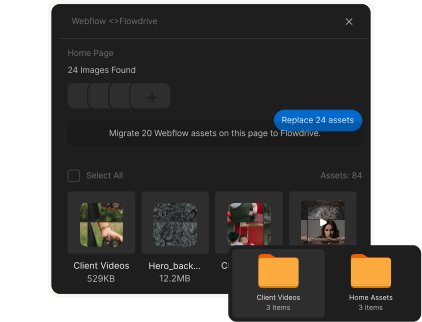
Install it once, migrate and replace assets in seconds. Manage videos, files, and uploads without ever leaving the designer.