Your Webflow Site Didn't Get Heavier. The Meter Got Smaller.
See how Flowdrive helps Webflow sites handle video and file hosting without bandwidth worries.
September 30, 2026

Learn how Flowdrive and Memberstack secure Webflow membership files with file-level protection to prevent unauthorized access and link sharing.
June 27, 2026 · Feature HighlightsFLOWDRIVE // MEMBERSTACK INTEGRATION
There is a gap that exists in almost every membership site built on Webflow, and most people who build them never notice it until someone points it out.
For example, you build a course, set up your plans, and gate the course page so only paying members can see it. The page is protected. But the video on that page, the PDF workbook below it, the template download at the bottom, those are files hosted somewhere. They have direct URLs. And a direct URL, once shared, does not check whether the person clicking it has a paid membership. Someone in your course downloads the PDF and pastes the link in a group chat.
The link goes to ten people, but none of them ever paid. The page was gated, but the file was not. This is the Webflow content gap. And it is more common than creators realise.
The content security problem is not unique to Webflow, the exposure is particularly relevant for creators who build membership and course sites without a dedicated platform that handles file access at the infrastructure level.
E-learning piracy alone is estimated to cause over $63 billion in losses annually, with password sharing and direct link sharing among the primary methods used to access paid content without paying.Most Webflow creators are not losing content to large-scale piracy operations. The exposure is more mundane: a shared login, a forwarded download link, a screenshot of a direct URL and when exclusive content gets leaked, three things happens. Therevenue bleeds out, community trust erodes because paying members feel shortchanged, and creator motivation drops because producing content feels increasingly pointless.The solution is not to build a more elaborate Webflow page structure. It is to secure the files themselves.
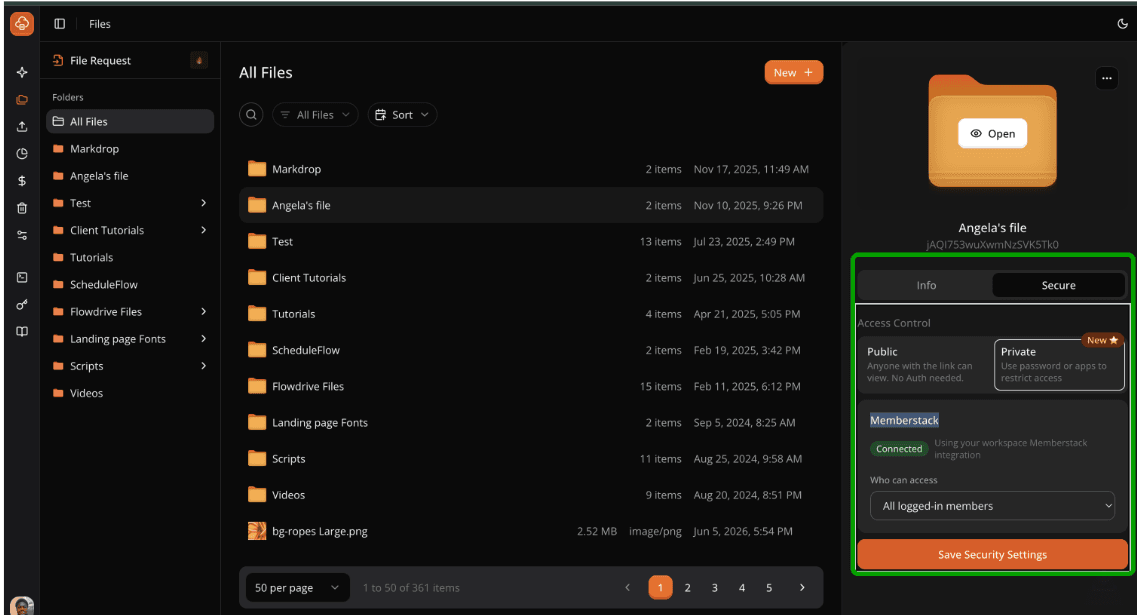
The integration connects Flowdrive's file hosting infrastructure to your Memberstack account. Once connected, any file or folder in your Flowdrive library can be locked to a specific Memberstack plan.
Securing a single file would require you to select it in Flowdrive, add the attribute, and specify which plan should have access.
Securing a folder is where the integration becomes particularly useful for creators with large libraries.A way to secure it is to lock the folder, and every file inside it inherits the same access rule. And when you add new files to the folder later, they inherit the rule automatically.
With only four steps and no coding requirement, setting up this feature is incredibly simple.
1. Integrate Flowdrive with Memberstack.
2. On Webflow, open the Flowdrive app in the Designer and click Enable uploads. It adds the Flowdrive script to your site for you.
3. Secure files and folders from the dashboard.
4. Add the data-fd-secure attribute to the element that shows the file, in the Webflow Designer.
Ready to bolster your Webflow security? Connect Memberstack with Flowdrive and secure your files today. And if you have questions? Visit our 24/7 active Slack community, or start a free trial at tryflowdrive.com.
Unlimited file hosting for Webflow projects.
See how Flowdrive helps Webflow sites handle video and file hosting without bandwidth worries.
Learn how Flowdrive simplifies image optimization for Webflow with compression, format conversion, version control, and fast previews.